


How to Activate a WoW Time Card on Battle.net — Step-by-Step Guide
Got a World of Warcraft Time Card and ready to jump back in? This guide walks you through every step of redeeming your activation code on Battle.net — from logging in to seeing your game time appear. Works for every region and every WoW version. The whole thing takes less than a minute.
📋 What You'll Need Before You Start
The activation process is quick and straightforward. Just make sure you have these two things on hand before you begin:
- Your WoW Time Card activation code — delivered to your email after purchase
- A Battle.net account with World of Warcraft attached to it
- A web browser or the Battle.net desktop app
Time Cards are region-locked. A card sold for the US won't work on a European account, and vice versa. Scroll down to the region guide if you're not sure which card your account requires.
⚙️ How to Redeem a WoW Time Card — 6 Simple Steps
Follow these steps on the official Battle.net website. The process is the same whether you're reactivating a lapsed account or adding game time on top of an existing subscription.
-
Navigate to the official Battle.net websiteOpen any browser and head to battle.net. Always use the official site — never a third-party redirect or mirror link.
-
Sign in to your Battle.net accountUse the email address and password tied to your account. If you have two-factor authentication (2FA) or an Authenticator app set up, complete that step as prompted.
-
Open Account SettingsOnce logged in, click on your account name or avatar in the upper-right corner of the page. Select Account Settings from the dropdown that appears.
-
Click the Account Overview tabInside Account Settings, find and click Account Overview. This section manages all your game time, subscriptions, and linked games.
-
Enter your Time Card activation codeLook for the field labeled Redeem a Code. Type or paste your WoW Time Card code exactly as provided — hyphens included. Don't add extra spaces before or after.
-
Hit "Redeem Code" — you're doneClick the confirmation button. Your game time is credited instantly. A success message will appear on screen confirming the redemption.
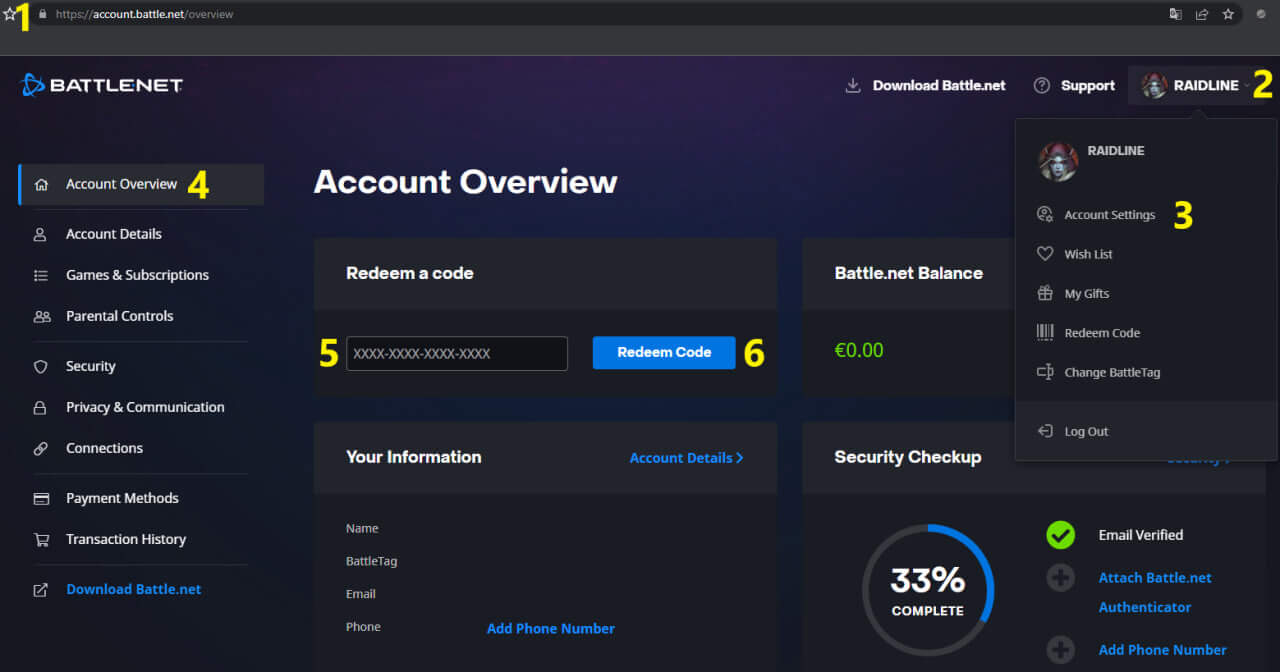
The numbered callouts in the screenshot correspond directly to the steps listed above.
- If your subscription is currently active — the 60 days are queued and tack on to the end of your existing billing period. Not a single day is lost.
- If your subscription is expired — the 60 days kick in immediately and your account is reactivated on the spot.
- You can stack multiple cards — there's no limit to how many Time Cards you redeem in advance. Queue up months of game time whenever cards are on sale.
🌍 Region Guide — Which WoW Time Card Do You Need?
WoW Time Cards are tied to specific Battle.net account regions. Using a card from the wrong region triggers an error during redemption and the code won't go through. Use the table below to find the right match for your account.
| Account Region | Servers Included | Correct Card to Buy | Also Accepts |
|---|---|---|---|
| Americas | US, Oceania, Latin America (LATAM) | 🇺🇸 US Time Card | — US only |
| Europe | All EU member state servers | 🇪🇺 EU Time Card | 🇷🇺 RU Time Card ✅ |
| Russia / CIS | Russian-language realms (part of EU infrastructure) | 🇷🇺 RU Time Card | 🇪🇺 EU Time Card ✅ |
| Asia | Korean, Taiwanese servers | 🌏 Asia Time Card | — Asia only |
Russian-language WoW servers run on the EU region's infrastructure. That means an EU card activates on Russian accounts, and an RU card activates on EU accounts. Players from any CIS country can safely use either card without any issues.
🎮 Which WoW Versions Does One Time Card Cover?
Here's one of the best things about Time Cards: a single code unlocks access to every available version of World of Warcraft at the same time. You don't need to juggle separate subscriptions or separate cards for different game modes.
| WoW Version | What It Is | Covered by Time Card? |
|---|---|---|
| WoW Retail | The current live, fully updated version of World of Warcraft | ✅ Yes |
| WoW Classic | Era-progression Classic servers following a set timeline | ✅ Yes |
| WoW Classic Era | Permanent 1.12 (Vanilla) servers with no progression wipe | ✅ Yes |
| Season of Discovery | Phased Classic content with runes, new mechanics, and discoveries | ✅ Yes |
| Hardcore (HC) | Classic with permadeath rules — one life per character | ✅ Yes |
| Anniversary Servers | Limited-run celebratory realms with special content and rewards | ✅ Yes |
Whether you're raiding current content in Retail, grinding levels in Classic Era, or challenging yourself on a Hardcore realm — your Time Card covers all of it under a single activation. Switch between game modes freely without any additional purchases.
⚖️ WoW Time Card vs. Monthly Subscription — Which Is Right for You?
Both a Time Card and a recurring subscription give you the same amount of game access. The difference is in how you pay and how much flexibility you get. Here's a side-by-side breakdown:
| Feature | 🎴 WoW Time Card | 💳 Monthly Subscription |
|---|---|---|
| Billing method | One-time prepaid code | Auto-renewing card charge |
| Credit card required | No — pay once, done | Yes — stored on file |
| Risk of accidental renewal | None | Yes, if you forget to cancel |
| Game time granted | 60 days per card | 30 days per billing cycle |
| Can stack in advance | Yes — queue multiple cards | No stacking |
| Buyable as a gift | Yes — just share the code | Not easily |
| Account sharing required | Never | Never |
| WoW versions covered | All versions | All versions |
🛠️ Troubleshooting — Code Not Working? Here's the Fix
Most activation issues come down to one of a handful of common causes. Check the table below to identify what's happening and how to resolve it quickly.
| Error Message / Symptom | Likely Cause | How to Fix It |
|---|---|---|
| "Invalid code" | Typo when entering the code | Copy-paste the code directly from your email instead of typing it. Watch for common mix-ups: the letter O vs. the number 0, and the letter I vs. the number 1. |
| "This code is for a different region" | Card region doesn't match your account region | Double-check which region your Battle.net account uses. Purchase the card that matches it. Remember: EU and RU cards are cross-compatible with each other. |
| "This code has already been redeemed" | Code was used before it reached you, or entered twice | First, check your Account Overview — the game time may already be on your account. If it's not there, contact your seller immediately with proof of purchase. |
| Page returns no confirmation or just refreshes | Browser session issue or timeout | Log out of Battle.net completely, close and reopen your browser, then log back in and try again. Check your Account Overview to confirm whether the time was applied. |
| Game time doesn't appear after a successful redemption | Display cache hasn't updated | Sign out of Battle.net fully, then sign back in. Game time typically appears within a few minutes. If you're in-game, you may need to restart the client. |
| Code was revoked after working initially | Code was sourced fraudulently (bot farming, stolen payment methods) | Contact your seller immediately. Keys purchased from verified sources like RaidLine are sourced directly from Blizzard and carry no revocation risk. |
If a Time Card code is revoked after you activate it, this almost always means it was generated through illegitimate means — typically using stolen payment credentials or bot-generated gold. Blizzard tracks and retroactively invalidates these keys. This risk is inherent to grey-market key resellers and unverified exchanges. Keys sold through RaidLine are purchased directly from Blizzard using legitimate funds, making revocation impossible.
🔐 Your Account Stays 100% in Your Hands
One of the biggest advantages of the Time Card method is that it requires zero access to your account by anyone other than you. Compare it to any service that asks for your login details — there's simply no comparison.
- Your Battle.net email address
- Your Battle.net password
- Your Authenticator or 2FA code
- Any other personal account credentials
The seller provides a plain activation code — nothing more. You handle the entire redemption yourself inside your own account. No third party ever touches your credentials, views your account, or has any access whatsoever. It's the safest way to pay for game time.
❓ Frequently Asked Questions
How do I redeem a WoW Time Card on Battle.net?
How long does WoW Time Card activation take?
Can I use a Time Card if my subscription is already active?
What happens if I use a Time Card from the wrong region?
Does activating a WoW Time Card require giving anyone my Battle.net password?
My code says "already redeemed" but I never used it — what should I do?
Can I send a WoW Time Card as a gift to a friend?
Does a WoW Time Card work for both Retail and Classic?
How do I check how much game time is left on my WoW account?
/played in the chat window to see total time played on your current character (this is session time, not remaining subscription time).Blog Tags
Related Products

WoW Time Card US — Official 60-Day Game Time for the Americas, Oceania & LATAM
WoW Time Card US — Official 60-Day Game Time for the Americas, Oceania & L..
29.98€

WoW EU Time Card — Buy 60-Day Official Game Time for European Servers
WoW EU Time Card — Buy 60-Day Official Game Time for European Servers Get 6..
29.98€

WoW Time Card RU — Official 60-Day Game Time for CIS & EU Players
WoW Time Card RU — Official 60-Day Game Time for CIS & EU Players Get 6..
29.98€