


How to Activate a WoW Time Card on Battle.net — Complete Guide
Everything you need to know about redeeming a World of Warcraft Time Card activation code on your Battle.net account. Works for all regions and all WoW versions. Takes under 60 seconds.
📋 Before You Start — What You Need
Before activating your WoW Time Card, make sure you have the following:
- A WoW Time Card activation code (delivered by email after purchase)
- A Battle.net account with World of Warcraft registered
- A browser or the Battle.net desktop application
Yes. Your Time Card must match the region of your Battle.net account. See the region guide below if you are unsure which card you need.
⚙️ Step-by-Step: How to Activate Your WoW Time Card
Follow these six steps on the official Battle.net website. The entire process takes under 60 seconds.
-
Go to the official Battle.net websiteOpen your browser and navigate to battle.net. Do not use third-party sites or unofficial mirrors.
-
Log in to your Battle.net accountEnter your registered email address and password. If you have two-factor authentication enabled, complete that step as well.
-
Navigate to Account SettingsClick on your account name or avatar in the top-right corner of the page, then select "Account Settings" from the dropdown menu.
-
Open the Account Overview tabInside Account Settings, find and click the "Account Overview" tab. This is where all game subscriptions and game time are managed.
-
Enter your Time Card activation keyLocate the code entry field labelled "Redeem a Code" or similar. Enter your WoW Time Card activation key exactly as provided — including any hyphens. Do not add spaces.
-
Click "Redeem Code" — doneClick the confirmation button. Your game time is credited to your account immediately. You will see a confirmation message on screen.
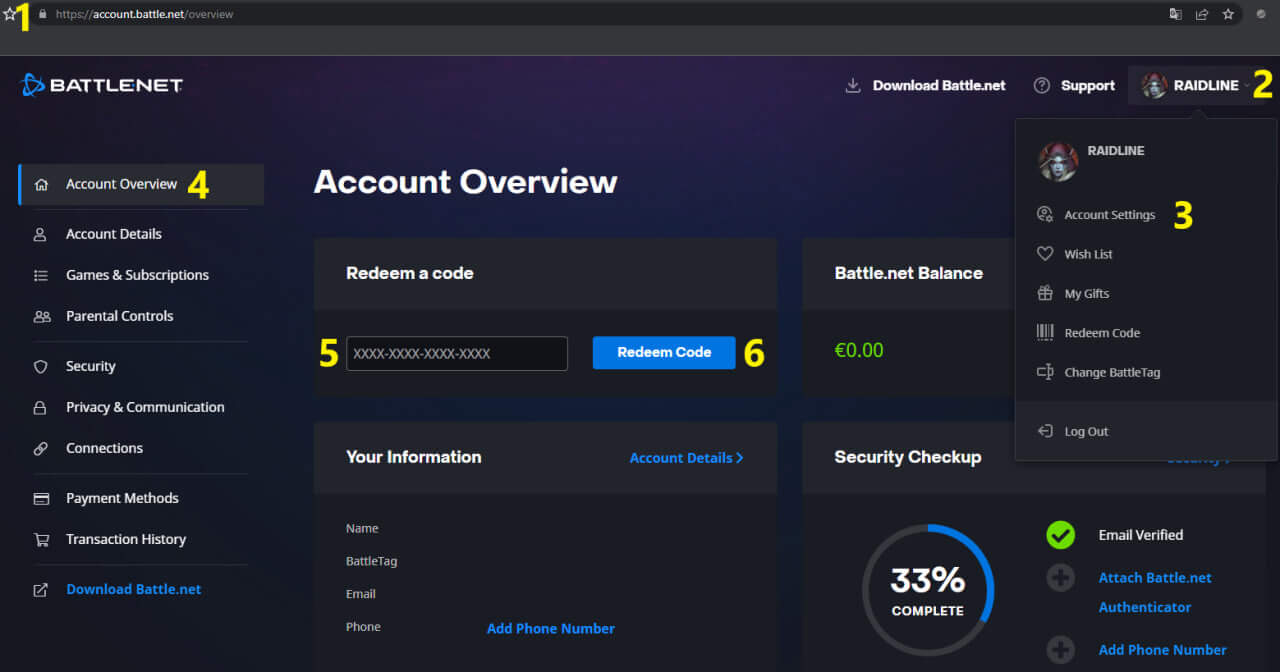
Yellow numbers in the screenshot correspond to each step in the guide above.
- If your subscription is currently active — the 60 days are added to the end of your current billing period. No time is lost.
- If your subscription is expired or inactive — the 60 days begin immediately. Your account is reactivated at once.
- You can stack multiple cards — redeem several Time Cards in advance to queue up game time for future months.
🌍 Which Region Time Card Do You Need?
WoW Time Cards are region-locked. Using a card from the wrong region will result in an error during redemption. Use the table below to identify the correct card for your account.
| Your Account Region | Servers You Play On | Card to Buy |
|---|---|---|
| Americas | US, Oceania, Latin America (LATAM) | 🇺🇸 US Time Card |
| Europe | All EU member states | 🇪🇺 EU Time Card |
| Russia / CIS | Russian-language servers (part of EU region) | 🇷🇺 RU or 🇪🇺 EU Time Card (interchangeable) |
| Asia | Korean, Taiwanese servers | 🌏 Asia Time Card |
Russian-language WoW servers are technically part of the EU region. This means an EU Time Card activates on RU servers, and an RU Time Card activates on EU servers. Players from CIS countries can safely use either.
🎮 Which WoW Versions Does One Time Card Activate?
A single WoW Time Card activates all available versions of World of Warcraft simultaneously. You do not need separate cards for different game modes.
| WoW Version | Description | Activated by Time Card? |
|---|---|---|
| WoW Retail | Current live version of World of Warcraft | ✅ Yes |
| WoW Classic | Progressive era progression servers | ✅ Yes |
| WoW Classic Era | Permanent Vanilla / 1.12 realms | ✅ Yes |
| Season of Discovery (SoD) | Phased classic experience with new content | ✅ Yes |
| Hardcore (HC) | Permadeath classic ruleset | ✅ Yes |
| Anniversary Servers | Celebration realms with special content | ✅ Yes |
🛠️ Troubleshooting — Common Activation Errors
If your code is not being accepted, use the table below to identify and resolve the issue.
| Error / Symptom | Most Likely Cause | Solution |
|---|---|---|
| "Invalid code" | Typo when entering the code | Re-enter the code carefully. Copy-paste directly from your email if possible. Check for O vs 0 and I vs 1 confusion. |
| "This code is for a different region" | Card region does not match account region | Purchase the correct regional card. EU and RU cards are interchangeable. US cards only work on US accounts. |
| "This code has already been used" | Code was previously redeemed | Check your Battle.net account — the time may already be there. If not, contact your card seller immediately. |
| No confirmation message appears | Browser issue or session timeout | Refresh the page, log out and log back in, then check your game time balance in Account Overview. |
| Game time not visible after redemption | Display cache | Log out of Battle.net completely, then log back in. Game time typically appears within a few minutes. |
If a code you purchased stops working or gets revoked, this is a sign it was obtained through illegal means — typically via bot-farmed gold or stolen payment cards. Blizzard retroactively invalidates such keys. This cannot happen with keys purchased from RaidLine, as every key is sourced directly from Blizzard with real funds. Revocation risk at RaidLine is 0%.
🔐 Activation Is 100% Safe — No Account Access Required
Activating a WoW Time Card is the safest way to add game time to your account. The process requires zero third-party access to your credentials at any point.
- Your Battle.net login email
- Your Battle.net password
- Your authenticator code
- Any other account credentials
You receive a plain activation code. You log into your own account yourself. You enter the code yourself. No seller, no third-party service, no one else ever touches your account. This is fundamentally different from — and far safer than — any service that requests your login details.
❓ Frequently Asked Questions
How do I activate a WoW Time Card?
How long does it take to activate a WoW Time Card?
Can I activate a WoW Time Card on an account with an active subscription?
What happens if I use the wrong region Time Card?
Does activating a WoW Time Card require sharing my account credentials?
My code says "already used" but I haven't activated it — what do I do?
Can I activate a WoW Time Card on someone else's account as a gift?
Which WoW versions become available after activating a Time Card?
How do I check how much game time I have left on my WoW account?
/played in the chat window to see time played on your current character. To check your remaining subscription or game time, log in to Battle.net and navigate to Account Settings → Account Overview → Game Time.Blog Tags
Related Products

Buy WoW Time Card US — 60-Day Official Game Time for Americas & Oceania
Buy WoW Time Card US — 60-Day Official Game Time for Americas & Oceania ..
29.98€

Buy WoW Time Card EU — 60-Day Official Game Time for European Servers
Buy WoW Time Card EU — 60-Day Official Game Time for European Servers Offic..
29.98€

Buy WoW Time Card RU — 60-Day Official Game Time for CIS Players
Buy WoW Time Card RU — 60-Day Official Game Time for CIS Players Official W..
29.98€
| 🔥 EXCLUSIVE WoW SERVICES – FAST & SAFE! 🔥 | ||||

Gold⚡ Instant Delivery 2-3 min Buy Now |

Raids⚔️ Start in 20-30 min Buy Now |

Mythic+💀 Any Difficulty Mode Buy Now |

PvP🏆 Play with Gladiators Buy Now |

Coaching🎮 Learn from real boosters Buy Now |
| ✅ 100% Safe – No Bots | ⭐ Trusted by 10,000+ Gamers | 🚀 Instant Delivery! | ||||